
Programmatic Video Localization: Scaling Multilingual Content with VideoFlow
October 31, 2026 · By VideoFlowLearn how to automate video localization and scale multilingual content using VideoFlow. Generate hundreds of language-specific MP4s from a single JSON template.
Programmatic Video Localization: Scaling Multilingual Content with VideoFlow
Scaling video content for a global audience usually means a manual nightmare: re-opening project files, swapping text layers, re-aligning subtitles, and babysitting render queues for dozens of localized versions. For engineering teams at SaaS companies or content automation platforms, this manual process is the primary bottleneck preventing a truly global reach.
Programmatic video localization changes the math. By treating your video as a data-driven template, you can generate hundreds of language-specific MP4s from a single source of truth. With VideoFlow's JSON-first architecture, you can move from a "one-off edit" mindset to a scalable "video factory" that handles everything from translated captions to right-to-left (RTL) text reflow automatically.
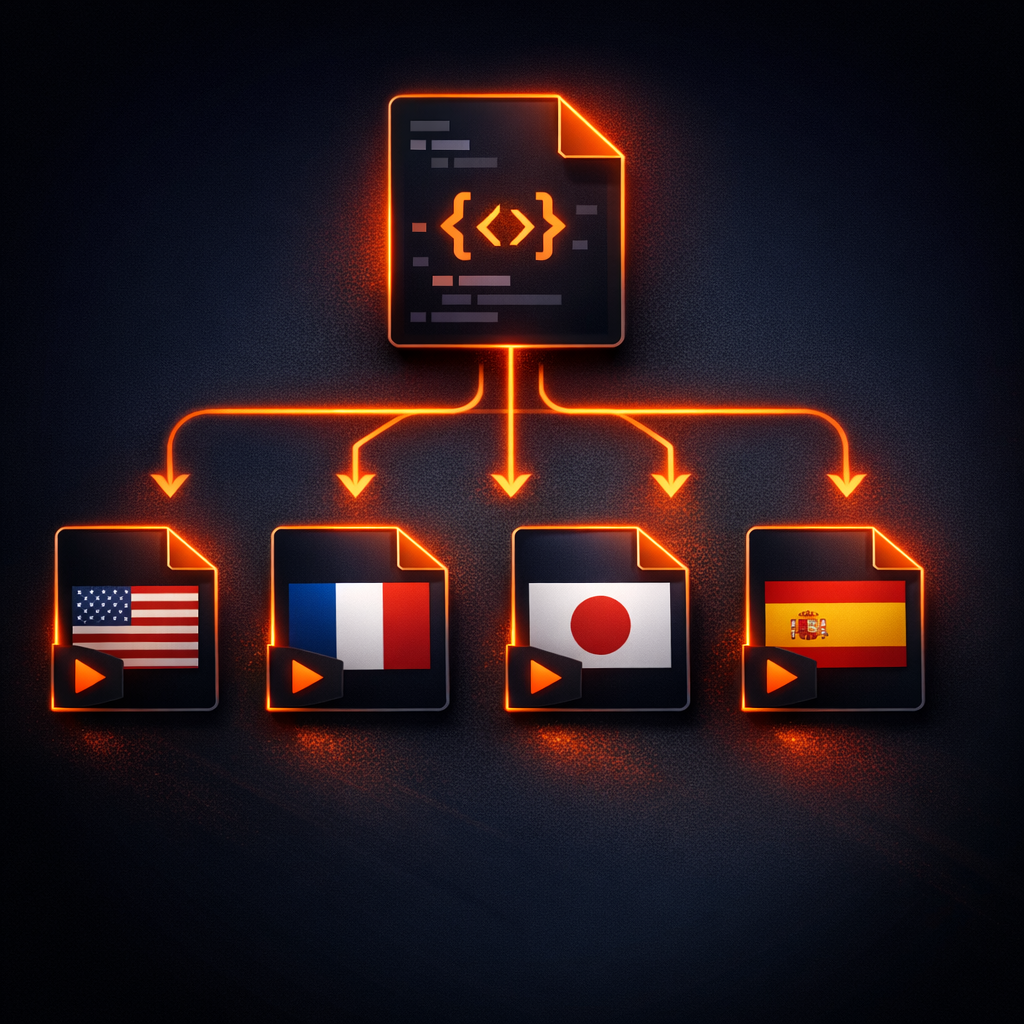
The Architecture: One Template, N Languages
The core advantage of using a toolkit like VideoFlow is the decoupling of content from composition. Instead of baking text into a video file, you define a VideoJSON document that describes the visual structure. To localize, you don't change the structure; you simply swap the data payload.
This is particularly powerful for language-agnostic video generation. Your backend (in Node, Python, or Go) can fetch translations from a CMS or an AI translation API, inject them into the JSON, and send the result to a renderer. Because VideoFlow's renderers are byte-for-byte consistent, the Spanish version you preview in the Playground will look identical to the final MP4 rendered on your server.
Implementing Multilingual Captions
Captions are the most common localization requirement. VideoFlow provides a dedicated CaptionsLayer that handles word-level timing and automatic line-breaking.
Here is how you would implement a localized caption system using the @videoflow/core builder. Note how we can easily swap the captions array based on the target locale:
import VideoFlow from '@videoflow/core';

const createLocalizedVideo = async (locale, translatedText) => {
  const $ = new VideoFlow({ width: 1920, height: 1080, fps: 30 });

  // Add a background image
  $.addImage({ fit: 'cover' }, { source: 'https://assets.example.com/bg.jpg' });

  // Add the localized captions
  const captions = $.addCaptions(
    {
      fontSize: 6,
      fontWeight: 700,
      color: '#ffffff',
      position: [0.5, 0.85], // Bottom-center
      textAlign: 'center',
      textShadow: true,
      textShadowBlur: '0.2em',
    },
    {
      captions: translatedText, // Array of { caption, startTime, endTime }
      maxCharsPerLine: 35,
      maxLines: 2,
    }
  );

  // Add a localized title with an entry transition
  const title = $.addText(
    {
      text: locale === 'jp' ? 'ビデオフローへようこそ' : 'Welcome to VideoFlow',
      fontSize: 8,
      color: '#FF5A1F',
      position: [0.5, 0.4],
    },
    { transitionIn: { transition: 'blurResolve', duration: '800ms' } }
  );

  $.wait('5s');
  return $.compile();
};
By following this pattern, your rendering logic remains constant while your content scales. You can find more details on captioning in our CaptionsLayer guide.
Handling RTL and Dynamic Text Reflow
Localization isn't just about translation; it's about layout. Languages like Arabic or Hebrew require Right-to-Left (RTL) support, while German often requires significantly more horizontal space than English.
VideoFlow's TextLayer and CaptionsLayer inherit robust CSS-like layout properties. To handle RTL, you simply set the direction property to 'rtl'. Because VideoFlow uses em units (where 1em = 1% of project width), your typography scales perfectly regardless of the output resolution.
// Example of an RTL text layer for Arabic localization
$.addText({
  text: 'مرحباً بك في فيديو فلو',
  direction: 'rtl',
  textAlign: 'right',
  fontSize: 7,
  position: [0.9, 0.2], // Anchor to the right side
});
How VideoFlow Handles Localization at Scale
VideoFlow was built for automation-first environments. Here is why it's the ideal choice for scaling multilingual content:
- Apache-2.0 Renderers: Use
@videoflow/renderer-serverto spin up a headless rendering cluster on AWS Lambda or Google Cloud Run. There are no proprietary per-minute fees for the core rendering engine. - Resolution Agnostic: Author your template once. Render it as a 1080p YouTube video, a 9:16 TikTok, or a 4K hero banner. The
em-based layout ensures your localized text never breaks the composition. - Built-in Transitions & Effects: With 27 transition presets (like
blurResolveandtypewriter) and 42 GLSL effects (likeglowandchromaticAberration), your localized videos maintain high production value without manual keyframing. - No FFmpeg Dependency: By default, the server renderer uses WebCodecs inside headless Chromium, avoiding the complexity of managing FFmpeg binaries and custom build flags for different character sets.
Get Started with Programmatic Video
Ready to stop editing and start automating? You can start building your localization pipeline today:
- Explore the Docs: Dive into the Builder API to see how to structure your templates.
- Try the Playground: Paste your translated JSON and see the results instantly in your browser.
- Star us on GitHub: Join the open-source community building the future of video-as-code.
Localization shouldn't be a hurdle to reaching a global audience. With VideoFlow, it's just another data point in your pipeline.